Coverage IQ

Know when staffing coverage becomes a risk

Coverage IQ monitors the staffing thresholds your operation defines and alerts the right people as soon as absence activity pushes coverage past those limits.

Configurable thresholds
Coverage alerts
Role, department & site visibility
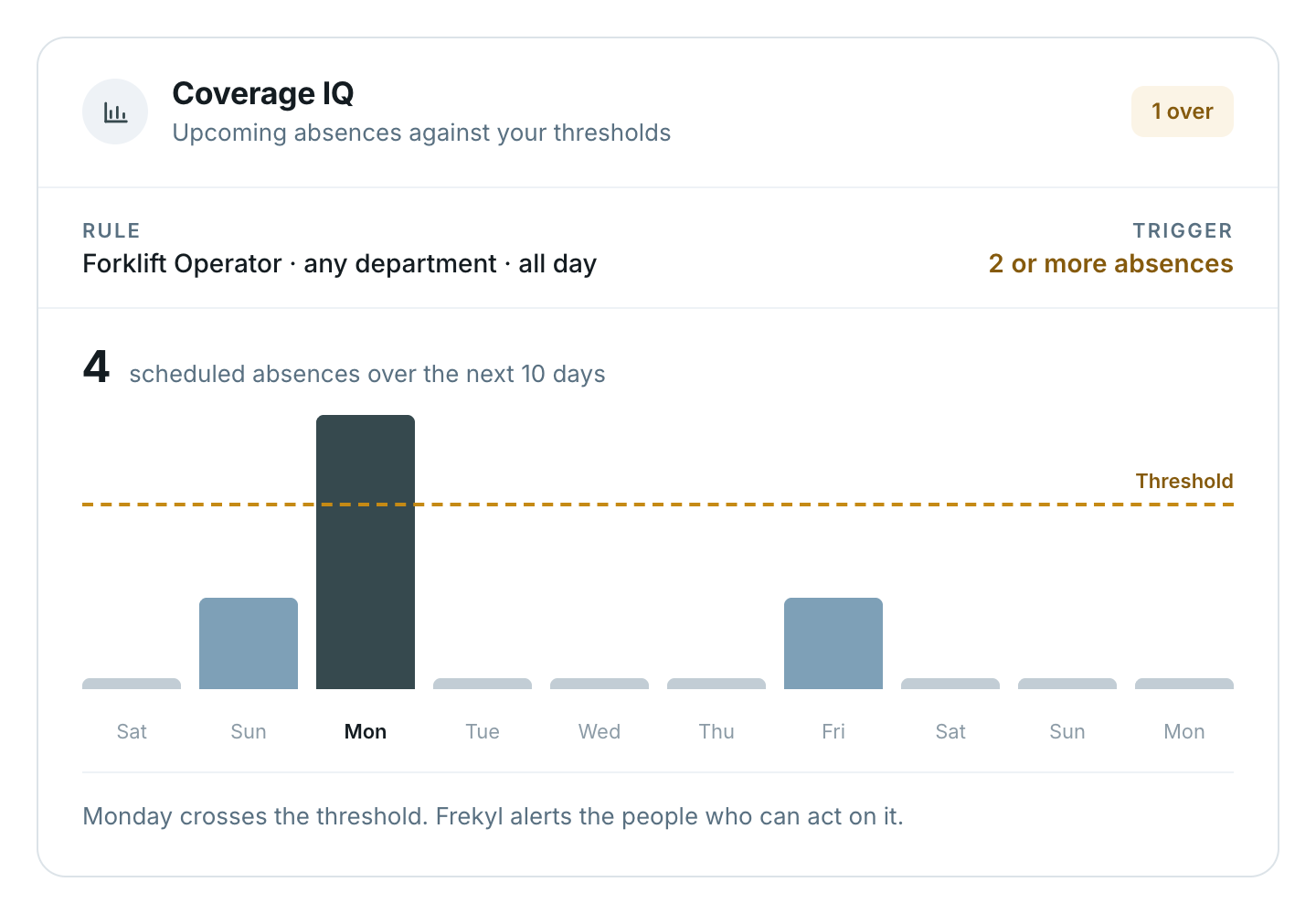
A plant supervisor checking his phone and a staffing coordinator at her laptop, either side of a Frekyl coverage alert by text — four absences today for Forklift Operator, threshold of one reached, with the manager replying YES to start the callout — and the Coverage IQ card showing upcoming absences against the threshold with Monday crossing the line
The visibility gap

Coverage problems are often discovered too late

Three forklift operators call off across different lines, but nobody realizes the combined impact until the floor is already understaffed.

Each one looks manageable on its own
Line 2 — one operator calls off05:12
Line 5 — one operator calls off05:48
Dock 4 — one operator calls off06:03
Three separate reports, three separate supervisors, no shared view of the total.
Combined impact
3 absences
Forklift Operator · threshold of 1 reached
The shift starts short, and the scramble to redistribute work begins after the fact.
How it works

From individual call-offs to operational coverage visibility

1
Define the thresholds
You configure the staffing levels and absence thresholds that matter to your operation.
Set against
RoleDepartmentFacility or site
2
Frekyl tracks absence activity
Absences reported through Frekyl are counted against those configured thresholds as they arrive.
Forklift Operator · today4
Counted as each call-off is reported
3
The threshold is reached
When the configured limit is crossed, Coverage IQ recognises that coverage condition.
Threshold of 1 reached
Forklift Operator · All Day
Reached
4
The right people are alerted
Managers, HR or other configured recipients receive the coverage alert.
Routed to
Plant manager
Dock 4 supervisor
HR business partner
5
Coverage action can begin
The team can respond before the staffing gap becomes a larger operational problem — including starting Shift Filling where that workflow is configured.
Callout started
12 qualified operators texted
Where configured
Your operation

Define what “coverage risk” means for your operation

A production cell, a nursing unit and a distribution dock do not share the same staffing reality. Each can carry its own threshold, set by the people who run it.
Your organization defines the staffing thresholds. Coverage IQ monitors against them. Frekyl does not determine safe staffing levels or required ratios.
Example thresholds
Configured by you
Forklift Operator
Any department · all day
1absence
Assembly 2
Production · day shift
3absences
Warehouse East
Whole facility · nights
5absences
Illustrative. Thresholds are configured against role, department and facility.
A Frekyl coverage alert by text — Manufacturing Inc, four absences today for Forklift Operator, All Day, threshold of one reached, asking whether to automate the callout, with the manager replying YES and Frekyl confirming twelve qualified operators were texted
Coverage alerts

Alert the right people the moment the threshold is reached

The alert carries the detail that makes it actionable — the role, the area, how many absences and which threshold was crossed. Recipients are routed according to your configured workflow.

The role and area affected, not a generic absence count
The count against the threshold that was configured
Delivered to the managers, HR or recipients you nominate
Where configured, the reply can start the callout straight from the alert
From risk to action

When coverage drops, start the backfill workflow faster

Explore Shift Filling →
Coverage IQ
Threshold reached
The configured limit for that role or area is crossed.
Alert
Manager notified
The people who can act on it receive the coverage alert.
Shift Filling
Callout begins
Where that workflow is configured, eligible employees are contacted.
Outcome
Coverage confirmed
The shift is covered and the record is updated.

Coverage IQ can help teams move quickly into the appropriate backfill workflow, including Shift Filling where configured.

Connected platform

Individual call-offs become a clear coverage picture

One absence may not be the problem. Several affecting the same role, department or facility is where the operational risk actually sits.

Explore Absence Reporting →
Absence ReportingCaptures each call-off
Coverage IQEvaluates them against your configured thresholds
ManagersSee the combined staffing impact
Where the pressure is

Coverage risk isn’t the same everywhere

A manager should see which area needs attention, not a single number for the whole organisation.

Area
Role
Absences
Status
North Plant
Machine Operator
0 of 3
Covered
Dock 4
Forklift Operator
4 of 1
Threshold reached
Assembly 2
Line Operator
2 of 3
Covered
Warehouse East
Picker
1 of 5
Covered

Illustrative. Areas, roles and thresholds are configured by your organization.

Earlier visibility

See the coverage problem before the shift feels it

Without Coverage IQ
Absences arrive individually

Each call-off is handled on its own. Managers may not realise the combined operational impact until staffing is already short.

With Coverage IQ
The threshold is monitored for you

Absence activity is counted against the limit you configured, and the appropriate team is alerted when that threshold is reached.


Where it fits

Operations that watch coverage by role and area

The platform

Coverage IQ turns absence data into an operational signal

Step one
Absence Reporting
Capture the call-off.
Step two
Coverage IQ
Identify when coverage thresholds are reached.
Step three
Shift Filling
Contact the eligible internal workforce.
Step four
Agency Connect
Escalate externally when the configured process requires it.

These products work together, but not every operation uses all four. Coverage IQ is part of the Frekyl platform rather than a separate add-on.

Integrations

Works alongside your workforce systems

Where integrated, workforce and absence data can flow between Frekyl and existing HR or workforce systems.

Explore integrations →

Workday, UKG, SAP, Dayforce, Microsoft Dynamics 365, Oracle, Zenefits and BambooHR connecting into Frekyl, with ADP, Paychex, Paylocity, gusto, Snowflake and Google BigQuery connecting from the other side
Questions

Coverage IQ FAQs

What does Coverage IQ monitor?
Coverage IQ monitors absence activity against staffing thresholds configured by your organization.
Can we define different thresholds for different roles or locations?
Where supported by configuration, thresholds can reflect the staffing requirements used across roles, departments or facility locations.
Does Coverage IQ predict future staffing shortages?
Its core function is monitoring configured thresholds against absence activity, not predicting shortages. Coverage IQ should not be described as a predictive staffing system.
Who receives Coverage IQ alerts?
Alerts can be routed to the appropriate managers, HR teams or other configured recipients according to your workflow.
Does Coverage IQ automatically fill the open shift?
Coverage IQ identifies when configured staffing thresholds are reached. Shift Filling can handle internal outreach where that workflow is configured.
Does Frekyl determine our minimum staffing requirements?
No. Your organization defines the staffing thresholds. Frekyl monitors against those configured rules.
Can Coverage IQ work with Absence Reporting?
Yes. Absence Reporting provides the structured call-off activity that Coverage IQ evaluates against your configured coverage thresholds.
Is Coverage IQ an add-on?
No. Coverage IQ is part of the Frekyl platform.
Coverage IQ

Don’t discover the coverage problem after the shift starts

See how Coverage IQ can alert your team when configured staffing thresholds are reached, so coverage action can begin sooner.

What we’ll walk through
The roles and areas you would watch first
Where your thresholds should sit
Who should receive the alert