Agency Connect

Internal coverage first. Agency fallback when you need it.

Agency Connect keeps internal shift filling and external staffing escalation in one workflow. Try your internal roster first, then automatically contact the staffing partners you choose if the shift is still open.

Internal-first workflows
Configurable fallback timing
Your approved agency partners
A plant supervisor checking his phone and a staffing coordinator at her laptop, either side of the Agency Connect partner directory listing Houston Staffing, Dallas Staffing Plus and New York Staffing with recent requests marked Filled, and the Agency fallback card showing a 30 hour wait, an 18 dollar per hour pay rate, launch now, Houston Staffing selected for this callout, and the note that internal staff are always offered the shift first

Your internal workforce and staffing partners no longer have to live in separate coverage workflows.

The old way

Why does the staffing process restart when the internal roster runs out?

One workflow ends. Another one starts from scratch, in a different place, with the same information typed again.

Inside the system
Open shift raised
Eligible employees contacted
Nobody accepts
Structured, timestamped, visible to everyone who needs it.
The handoff
manual from here
Outside the system
Someone looks up agency contacts
Shift details retyped into email and calls
Replies arrive across separate channels
No shared view, no timestamps, no single record of what was asked or answered.

Agency Connect removes that handoff. The escalation happens inside the same callout, against the same shift, with the same record.

One coverage workflow

From internal callout to agency coverage without starting over

Six phases, one continuous process. The internal attempt and the external escalation are the same workflow — not two systems bridged by a phone call.

Phase one · internal
1
Open shift
A coverage need enters Shift Filling — raised directly, or created by an absence reported through Frekyl.
Forklift Operator
Dock 4 · 14:00–22:00
Open
2
Internal employees are contacted
Frekyl runs your configured internal callout — eligibility, order and channels all follow your own procedure.
Eligible contacted12
SMS and IVR · your internal window
3
The shift remains open
Agency fallback waits according to the timing you configured — not a fixed interval Frekyl decides.
No acceptances
Fallback window reached
Your wait time
Phase two · agency
4
Agency Connect activates
The workflow moves into the external staffing step you configured — immediately, or at a time you set.
Launch
ImmediatelyAt a set time
5
Selected staffing partners are contacted
Only the partners chosen for that callout participate. The request carries the shift details, pay rate and instructions you supplied.
Houston Staffing
Dallas Staffing Plus
Chicago Staffing Group
6
Coverage remains visible
The agency request stays attached to the same shift and the same record, through to the outcome.
Shift covered
One record, internal through agency
Filled
Agency fallback

You decide when external staffing enters the workflow

Fallback is configured per workflow — whether it is enabled at all, how long Frekyl waits, when the request launches, and which partners take part.
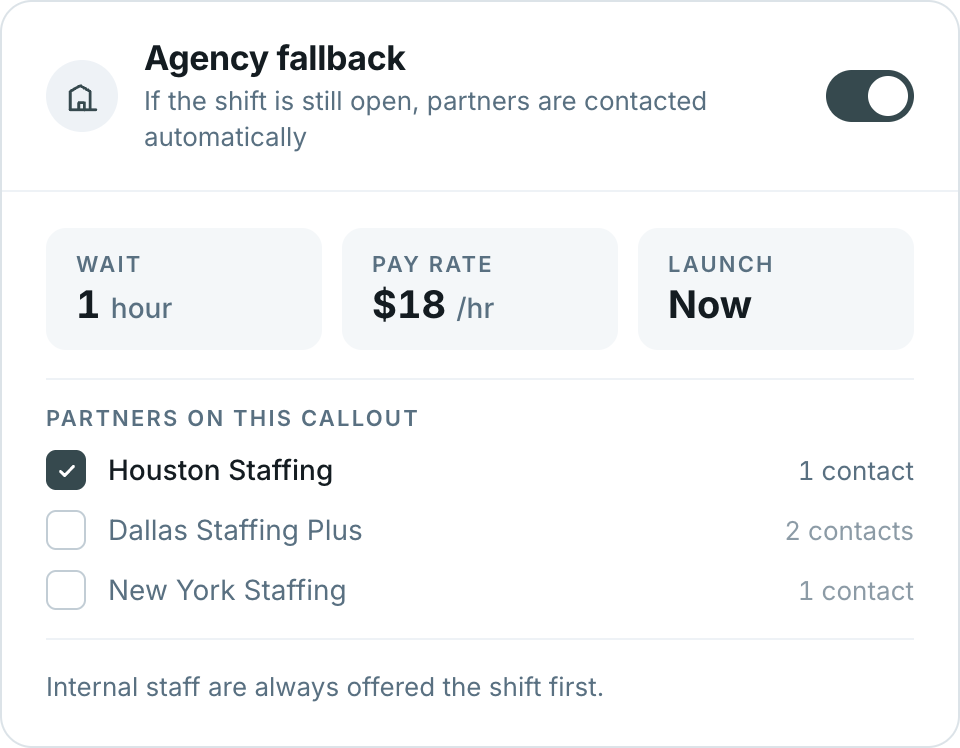
Enable or disable agency fallback for the workflow
Set how long to wait before escalating externally
Launch immediately or at a time you choose
Select which staffing partners participate
Include pay rate, notes, certifications, PPE and instructions
Agency fallback settings — enabled, wait 30 hours, pay rate 18 dollars per hour, launch now, partners on this callout with Houston Staffing selected, Dallas Staffing Plus and New York Staffing unselected, and the note that internal staff are always offered the shift first
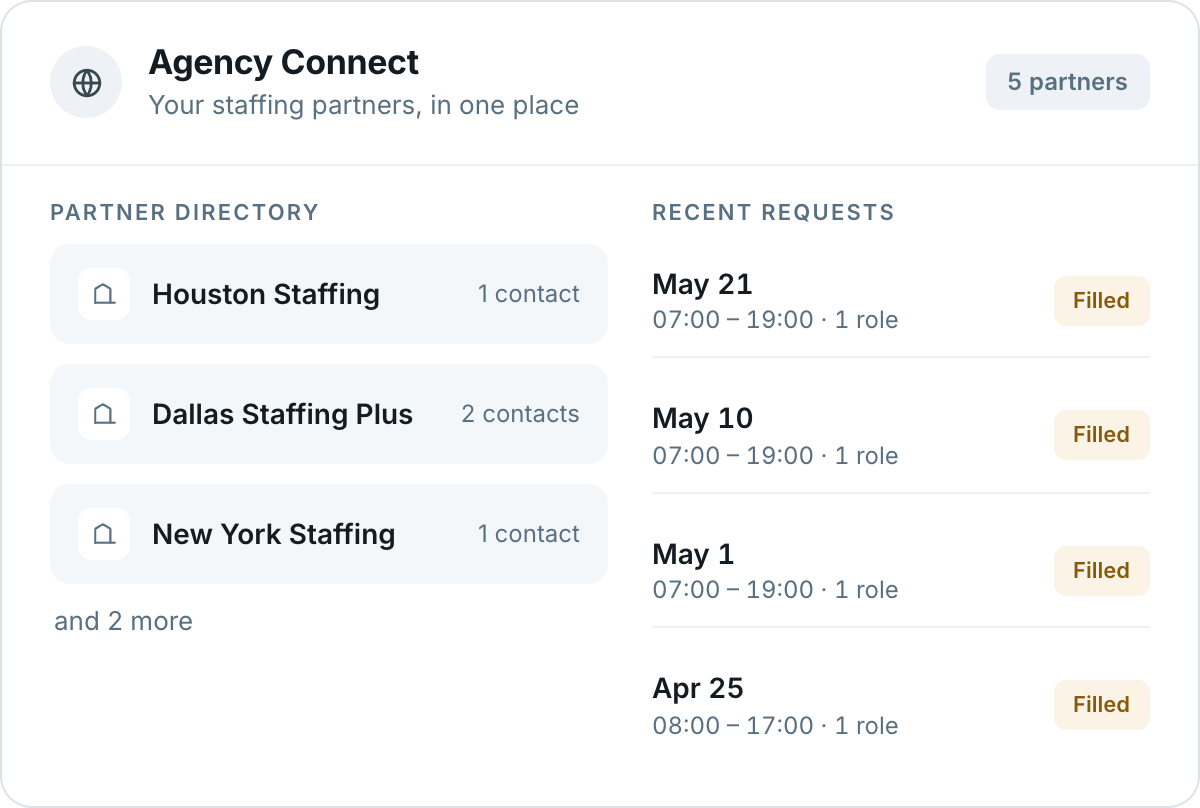
Agency Connect — your staffing partners in one place. Partner directory listing Houston Staffing with one contact, Dallas Staffing Plus with two contacts and New York Staffing with one contact, and two more, beside recent requests for May 21, May 10, May 1 and April 25 all marked Filled
Three staffing agency colleagues at a desk, one on the phone taking notes while two review a laptop together
A request lands with a named contact
Not a shared inbox somebody checks later — the people your organization already works with, reached the way you agreed.
Your network

Keep your staffing partners organized and ready

These are your existing, approved partners — not a marketplace. Frekyl is the workflow that connects them to a coverage need.

01
Maintain the partner list
The staffing companies your organization already works with, kept current in one place.
02
Associate contacts
One or more named contacts per partner, so a request reaches a person rather than a shared inbox.
03
Choose who takes part
Select which partners participate in a given callout — the rest stay out of it.
04
See recent requests
Which partners were asked, what came back, and how the shift was ultimately covered.
Your rules

Your agencies. Your timing. Your rules.

Choose your partners
Only the staffing companies your organization has approved take part.
Choose the timing
How long internal outreach runs before escalation, and when the request goes out.
Choose where it applies
Which sites, departments and roles can use agency fallback at all.
Choose the approvals
Where your process requires sign-off, approval steps can sit in the workflow.

Your organization defines the agency process. Frekyl executes the communication workflow.

Connected platform

Absence Reporting → Shift Filling → Agency Connect

These products can work together as one chain — or independently, according to the configuration you choose.

Absence ReportingAn employee calls off by text or automated callCaptured as a structured record
Shift FillingEligible internal employees are contactedYour eligibility and award rules
Still openThe internal window closes without coverageFallback timing you configured
Agency ConnectSelected staffing partners are contactedYour approved partners only
OutcomeCoverage confirmed and recordedOne timestamped record throughout
Why this matters

External staffing should be part of the workflow, not a separate emergency process

Two staffing coordinators reviewing an open coverage request together on screen, with colleagues working behind them
Fewer disconnected phone and email chains
The request goes out from the workflow that raised it.
No repeating the shift details
Role, site, times and requirements carry through from the open shift.
Structured escalation instead of ad hoc calls
The same procedure runs whoever is on shift when it happens.
Visibility from internal outreach through external coverage
One view of where the shift stands, at any point.
Consistent use of preferred partners
The agreed order is followed rather than whoever comes to mind.
Multi-site operations

Different sites can follow different staffing paths

A distribution centre and a remote plant rarely share the same partners, the same timing or the same approvals.

Site
Partners in order
Wait
Approval
Dock 4 · Distribution
Houston → Dallas Staffing Plus
12 hrs
Not required
North plant · Production
Chicago Staffing Group only
30 hrs
Manager
Terminal 3 · Remote
New York → Houston → Dallas Staffing Plus
6 hrs
Ops lead

Illustrative. Partners, order, timing, eligible roles and approval steps are configured per site and department by your organization.

Coverage IQ

See the gap coming before you need the fallback

Coverage IQ counts upcoming absences against the thresholds you set. When a day crosses the line, the people who can act on it are alerted — so agency escalation is a planned step rather than a scramble on the morning of the shift.
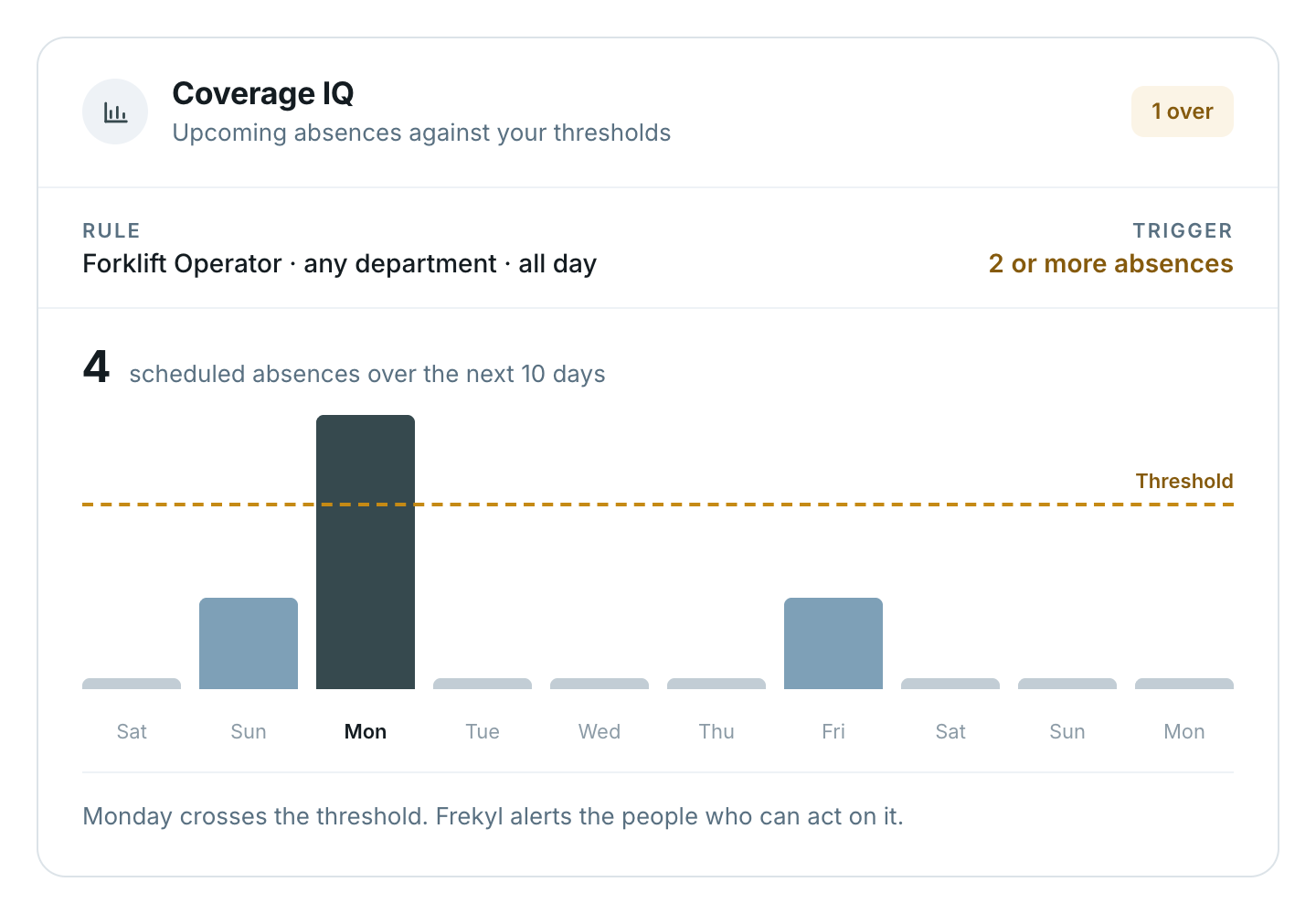
Thresholds set by role, department and shift
Part of the platform, alongside Shift Filling and Agency Connect
Coverage IQ showing upcoming absences against thresholds — rule set to Forklift Operator, any department, all day, triggering at two or more absences, with four scheduled absences over the next ten days and Monday crossing the threshold
Operational visibility

Know where every open shift stands

Internal outreach and agency escalation appear in the same history, on the same shift.

Callout #AC-1182 · Forklift Operator, Dock 4
12 internal3 partnersCovered
Open shift created06:02
Internal callout opened — 12 eligible contacted06:04
Internal window closed without acceptance06:49
Agency fallback triggered06:49
Request sent — Houston, Dallas Staffing Plus, New York06:50
Dallas Staffing Plus — no response07:06
Houston Staffing — accepted07:11
Coverage confirmed, managers notified07:14
Where it fits

Operations that keep an external fallback ready

Integrations

Works alongside your workforce systems

Frekyl runs standalone. Where integrated, workforce and absence data can flow between Frekyl and existing HR or workforce systems.

Explore integrations →

Workday, UKG, SAP, Dayforce, Microsoft Dynamics 365, Oracle, Zenefits and BambooHR connecting into Frekyl, with ADP, Paychex, Paylocity, gusto, Snowflake and Google BigQuery connecting from the other side
Questions

Agency Connect FAQs

Can Agency Connect be used without Shift Filling?
Agency Connect is built around the escalation step of a coverage workflow — internal outreach first, then external staffing where your configuration calls for it. How it fits your operation depends on how your workflows are set up, which is something we walk through during a demo.
Can we choose which agencies receive staffing requests?
Yes. Customers configure their preferred staffing partners and the rules governing agency outreach, including which partners participate in a particular callout.
Can different sites use different agencies?
Where configured, agency workflows can reflect the staffing process used by different sites or operating groups.
Does Frekyl choose which staffing agency we should use?
No. Your organization defines the agencies and the escalation process. Frekyl automates the configured workflow.
Can internal employees be contacted before agencies?
Yes, where configured. Agency Connect can follow an internal Shift Filling workflow before escalating externally.
Does Agency Connect negotiate agency rates?
No. Frekyl does not negotiate or set rates. Where your workflow includes pay rate information, that information is supplied by your organization and passed through with the staffing request.
Can managers approve agency escalation?
Where configured, approval steps can be included in the staffing workflow.
Is the agency escalation process recorded?
Frekyl maintains timestamped workflow records according to supported platform functionality, so the internal outreach and the agency escalation sit in the same history.
Agency Connect

When internal coverage runs out, don’t restart the staffing process

See how Agency Connect can keep agency escalation structured, visible, and connected to your existing coverage workflow.

What we’ll walk through
Your approved partners and their contacts
When fallback should trigger, per site
One callout, internal through agency